
- > Grow a Garden Fall Market Event Guide – What to Expect
- > Grow a Garden Roblox: September 2025 Codes Update – Redeem Free Rewards Now!
- > How to Quickly Get More Enchanted Eggs in Grow a Garden Roblox Fairy Event
- > Trade Scams in Grow a Garden Roblox: How to Protect Yourself
- > How to Gift Seeds in Grow a Garden Roblox – Complete Guide
- > How to Calculate the Value of a Crop in Grow a Garden Roblox (Complete Mutation Guide)
Grow a Garden Roblox: Complete Guide to Pet Mutations
Pets in Grow a Garden Roblox are more than cute companions—they can boost your farm’s efficiency through mutations. Pet mutations give pets unique abilities or perks that can help with XP gain, fruit collection, and other farming tasks.
This guide explains how to apply mutations, provides a full mutation table, and shows how to obtain Pet Mutation Shards.
What Are Pet Mutations?
Pet mutations are special traits that can be applied to pets, granting them unique abilities or passive boosts. Mutations are applied either through the Mutation Machine or by using Pet Mutation Shards.
How to Apply Pet Mutations
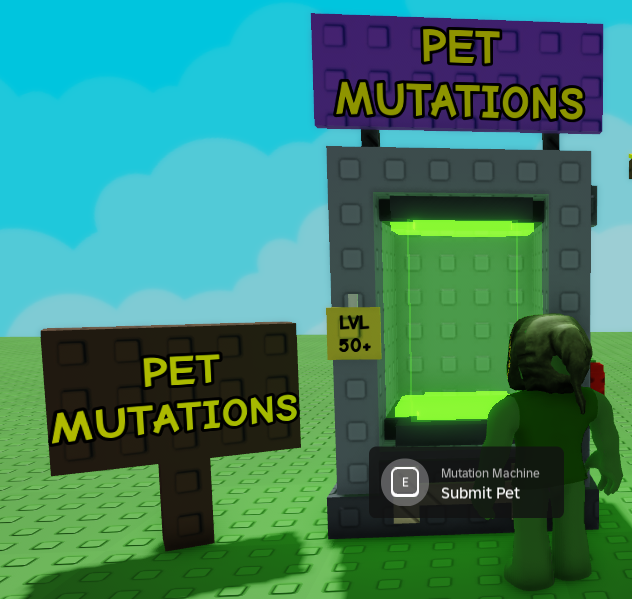
1. Using the Mutation Machine
-
Your pet must be at least level 50.
-
Visit the Mutation Machine near the Egg Shop.
-
Insert your pet and start the mutation process.
-
Mutation takes 1 hour and resets the pet’s age to 1.
2. Using Pet Mutation Shards
-
Pet Mutation Shards can apply a specific mutation instantly.
-
Only one mutation can be active at a time; using a shard will overwrite the existing mutation (except for Rainbow Egg pets, which can stack certain mutations).
How to Get Pet Mutation Shards
Pet Mutation Shards are obtainable in several ways:
-
Purchase from NPCs: Some shards are sold by special merchants, such as the Rat Connoisseur.
-
Crafting Events: Certain shards, like Mega, are craftable during Beanstalk or seasonal events.
-
Loot from Bosses or Chests: Some rare shards drop randomly from events or endgame activities.
-
Trading: Other players may sell shards in exchange for Sheckles or rare items.
Full List of Pet Mutations & Effects
| Mutation Name | Passive Ability | Type | Chance | Obtainable |
|---|---|---|---|---|
| Shiny | +15% XP/sec | Pet XP Boost | 32.15% | Yes |
| Inverted | +30% XP/sec | Pet XP Boost | 16.08% | Yes |
| Frozen | 20–30% chance to freeze nearby fruit every ~5 min | Environmental Effect | 9.65% | Yes |
| Windy | 20–30% chance to windstrike nearby fruit every ~30–300 sec | Environmental Effect | 9.65% | Yes |
| Golden | +10% passive boost for all pets of the same kind | Passive Boost | 6.43% | Yes |
| Mega | +200% size, 20% faster hunger rate, 10–40 XP/sec | Size Modification | 6.43% | Yes |
| Tiny | -90% size, 20% slower hunger rate, 5–30 XP/sec | Size Modification | 6.43% | Yes |
| IronSkin | 35–45% chance to recover stolen fruit | Stealing Preventer | 3.22% | Yes |
Benefits of Pet Mutations
-
Boost XP Gain: Mutations like Shiny and Inverted increase your pet’s XP rate.
-
Enhance Farming Efficiency: Frozen and Windy mutations affect nearby fruits, aiding harvesting.
-
Increase Pet Utility: Mega or Tiny changes size and hunger rate for specific advantages.
-
Protect Your Harvest: IronSkin prevents fruit theft.
Tips for Maximizing Pet Mutation Efficiency
-
Target Specific Mutations: Use shards for desired effects, like XP boosts or fruit interaction.
-
Stack Events: Farm and mutate during merchant or seasonal events to increase value.
-
Use Pets Strategically: Pair high-multiplier pets with powerful mutations for maximum benefit.
-
Plan Your Shard Usage: Only mutate pets when necessary, as using a shard overwrites the current mutation.

Conclusion
Pet mutations in Grow a Garden Roblox are essential for players looking to maximize their farming potential. By understanding how to apply mutations, obtain Pet Mutation Shards, and utilize the passive abilities effectively, you can make your garden more productive and profitable.
With the table above as a reference, you’ll always know which mutations to target and how to enhance your pets’ performance.
Table of contents
Buy Grow A Garden Products
Recommended Article