
- > How to Get Infinite Safari Eggs Fast in Grow a Garden (Roblox)
- > Next Admin Abuse Event in Grow a Garden: Stomy Sundays?
- > Ice King Event and How to get Frostspike in Grow a Garden
- > How to Use the Fairy Ring and Travel to the Fairy World in Grow a Garden Roblox
- > Grow a Garden Adds 10% Sheckles Trading Tax After Garden Ascension
- > Grow a Garden Roblox: September 2025 Codes Update – Redeem Free Rewards Now!
How to Gift Seeds in Grow a Garden Roblox – Complete Guide
In Grow a Garden Roblox, gifting is a key way to share resources with friends, help them complete mutations, and boost community interaction. Players can gift seeds, crops, or pets, but each type of gift works differently.
Seeds are unique because they must be gifted from the Seed Shop using in-game currency or Robux, unlike crops or pets that can often be gifted directly from your inventory or via trading. Understanding these differences is essential for smooth gifting.
How to Gift Seeds
Step 1: Open the Seed Shop
Visit the in-game Seed Shop, where all purchasable seeds are listed. Only seeds purchased here are eligible for gifting.
Step 2: Select a Seed
Click the seed you want to gift. The “Gift” button will appear next to the price.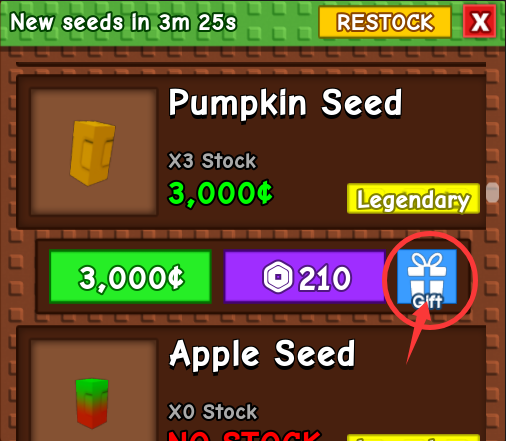
Step 3: Choose a Recipient
Select a player from your server to receive the seed. Only players on the same server can be chosen.
Step 4: Confirm the Gift
Use Sheckles or Robux to finalize the gift. The seed will then appear in the recipient’s inventory.
Trading Seeds
Alternatively, seeds can be traded:
-
Locate another player in the server.
-
Open the trade menu or accept a trade invitation.
-
Add seeds from your inventory to the trade slots.
-
Confirm the trade to transfer the seeds.
What Can and Cannot Be Gifted
Can Be Gifted
-
Seeds purchased from the Seed Shop
-
Harvested crops (fruits and vegetables)
Cannot Be Gifted
-
Sprinklers
-
Lightning rods
-
Gear or equipment
Comparing Seed Gifting with Crop and Pet Gifting
| Feature | Seeds | Crops | Pets |
|---|---|---|---|
| Source | Seed Shop | Inventory / Farm | Pet Menu / Trading |
| Currency | Sheckles / Robux | Usually free | Sheckles / Rare currency |
| Server Restriction | Must be on same server | Usually flexible | Must be on same server |
| Permanence | Permanent transfer | Usually consumable | Permanent unless traded back |
| Use | Planting / Mutations | Quick harvest / Recipes | Companions / Abilities |
Key Insight: Seeds require more planning because they are purchased and sent via the Seed Shop, while crops are simpler to share, and pets often have additional utility in the game. Seed gifting is more strategic and rewarding, especially for rare or divine seeds.
Tips for Efficient Gifting
-
Focus on rare seeds first to maximize impact.
-
Coordinate with friends for mutations or event goals.
-
Use trades for flexibility if the Seed Shop option is limited.
Some players also choose to buy rare seeds or sheckles from trusted marketplaces like SSEGold to gift friends faster and boost community growth.
Conclusion
Gifting seeds in Grow a Garden Roblox is simple yet strategic. By using the Seed Shop or trading interface correctly, players can share rare resources safely. Compared with crops or pets, seeds require currency, planning, and server coordination, making them a valuable and rewarding gift for friends.
Table of contents
Buy Grow A Garden Products
Recommended Article