
- > Arc Raiders Expedition 4 Requirements: Caravan Stage 5 Breakdown & Fast Farming Guide
- > ARC Raiders Wipe Guide: Fast-Track Fourth Expedition Requirements Before June 22
- > ARC Raiders Riven Tides Map Guide: Hotel Panorama Azzurra Extraction Strategy
- > ARC Raiders Stash Space Guide: Optimize Inventory Like a Pro
- > Arc Raiders Frequency Modulation Box Locations - Complete 2026 Guide
- > ARC Raiders Patch 1.21.0 & Flashpoint Update: Full Details Revealed
How to Upgrade the Workbench in ARC Raiders
Many players in ARC Raiders get confused when they try to upgrade the Workbench — it shows “Level 1,” but there’s no button, no requirements, and no upgrade options. If you’re stuck here, you’re not alone.
This guide explains why the Workbench can’t be upgraded, how the real upgrade system works, the best stations to level first, and how to get materials faster so you can progress smoother.
If you want a head start, you can also buy ARC Raiders items safely and quickly at SSEGold, a trusted gaming marketplace with years of professional delivery.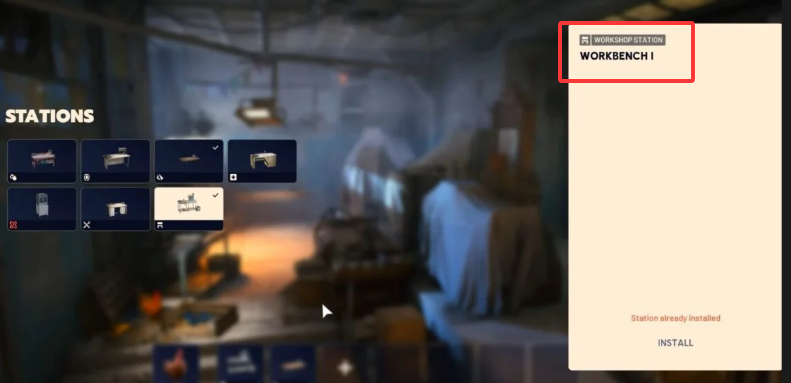
Can You Upgrade the Workbench in ARC Raiders?
No — the basic Workbench cannot be upgraded.
It stays at Level 1 permanently, and the game currently does not offer a way to upgrade it. This often causes confusion because:
-
It still displays Level 1 like other stations
-
It has no “Level Up” tab
-
Players expect it to unlock new blueprints
But this is not a bug — the Workbench is meant to remain fixed.
Instead, ARC Raiders lets you upgrade the other crafting stations inside the Workshop, which actually unlock new gear, items, and crafting tiers.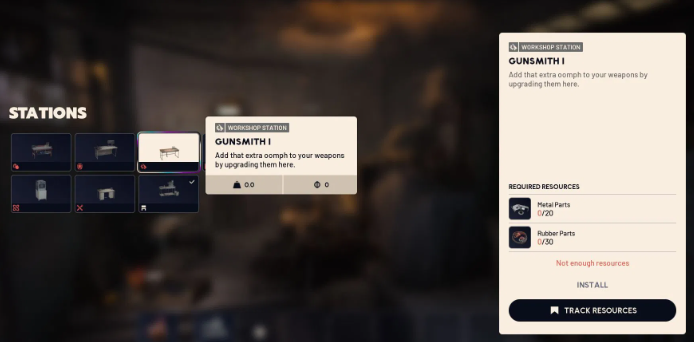
All Upgradable Stations in ARC Raiders
While the Workbench doesn’t upgrade, these stations do:
1. Gunsmith
Craft and improve weapons; unlocks stronger gun tiers.
2. Gear Bench
Craft armor pieces and defensive gear.
3. Medical Lab
Heals, medkits, and support items.
4. Utility Station
Gadgets, deployables, and tactical tools.
5. Explosives Station
Grenades, mines, and throwable weapons.
6. Refiner
Converts raw resources into higher-tier materials.
7. Scrappy (Base Helper)
Your “rooster” companion; improves crafting efficiency and passive functions.
Each of these stations can be leveled up to increase crafting power, unlock stronger recipes, and improve efficiency.
How to Upgrade Any Crafting Station (Step-by-Step)
Upgrading is the same for every station except the un-upgradable Workbench.
Step 1 — Go to the Workshop
Enter your Raider Den and interact with the Workshop menu.
Step 2 — Select the Station You Want to Upgrade
For example: Gunsmith → Medical Lab → Refiner → etc.
Step 3 — Open the “Level Up” Tab
This tab shows:
-
Required materials
-
Required components
-
Level benefits
-
A “Track Resources” option
If you don’t see this tab, you are on the Workbench — the only station that doesn’t upgrade.
Step 4 — Gather Materials
Upgrade materials may include:
-
Metal Parts
-
Mechanical Components
-
ARC Alloy
-
Rusted Tools
-
Fabric
-
Electronics
-
Recycled Scrap
Use Track Resources to highlight items in raids so you can find them faster.
Step 5 — Press “Level Up”
Once requirements are met, confirm the upgrade.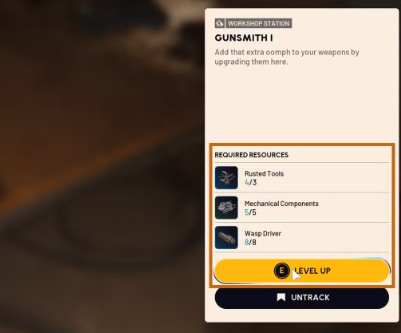
Best Stations to Upgrade First
If you’re not sure where to spend your early materials, here’s the recommended priority order:
1. Gunsmith
Gives stronger weapons early, which directly increases survivability and raid success.
2. Medical Lab
Better healing items mean fewer deaths and smoother high-risk expeditions.
3. Refiner
Massive long-term value; converts junk into high-quality materials for future upgrades.
4. Utility Station
Good for players who rely on gadgets or want advanced tactical tools.
The others can be done later unless your build depends on them.
How to Farm Upgrade Materials Faster
Here are quick tips to speed up your progression:
• Focus on ARC enemy zones
Machines drop higher-value components more often.
• Salvage all junk gear
Break down unwanted weapons and tools for immediate materials.
• Use the “Track Resources” feature
Huge time-saver — highlights the exact items you need.
• Run open-world zones with dense enemy clusters
More kills = more drops.
• Don’t ignore small containers
Even small scavenged items can turn into much-needed components.
Common Mistakes to Avoid
Avoid these rookie errors:
-
Trying to upgrade the Workbench (it’s impossible)
-
Upgrading low-priority stations first
-
Holding materials too long instead of crafting better tools
-
Forgetting to refine items into high-tier materials
-
Ignoring the importance of Medical Lab upgrades
Fixing these improves progression dramatically.
FAQ (High-Value SEO Section)
Why is my Workbench stuck at Level 1?
Because the Workbench cannot be upgraded in the current version of ARC Raiders.
How many levels do stations have?
Most stations go up to Level 3.
Why don’t I see the Level Up tab?
You’re likely interacting with the basic Workbench — the only non-upgradable station.
What’s the fastest way to get materials?
ARC enemy farming → salvage gear → use the Refiner → track resources.
Which station should beginners upgrade first?
Gunsmith → Medical Lab → Refiner is the recommended order.
Final Tips
Upgrading crafting stations is one of the most important progression systems in ARC Raiders. Focus on the Gunsmith, Medical Lab, and Refiner first, farm materials efficiently, and ignore the Workbench’s misleading “Level 1” label — it simply doesn’t upgrade.
If you want to speed things up, you can also buy ARC Raiders materials and items safely at SSEGold, with fast delivery and professional service trusted by players for years.
Table of contents
Buy ARC Raiders Products
Recommended Article