
- > Capybara Paradise WoW Private Server: The Ultimate English Player’s Guide & How to Get Ahead
- > Is Blox Fruits VIP Private Server Worth It in 2026?
- > Private Servers in Steal a Brainrot: How They Work & Are They Really Safe?
- > Is Warmane Really the Most Populated WoW Private Server? Analyzing Player Counts & Server Trends
- > Dune Awakening Private Servers Now Live: Everything You Need to Know
- > Best Blueprint Recipes You Need to Buy in The Forge (Roblox)
How to Get a Private Server in The Forge (Roblox Game)
In response to player feedback, The Forge has introduced the option for private servers, allowing you to enjoy a more secure and private mining experience, free from exploiters and hackers. If you’ve been struggling to get your hands on ores without interference, a private server is exactly what you need. Luckily, setting up a private server in The Forge is straightforward, and we’re here to guide you through the process step-by-step.
If you want to start mining in peace and avoid disruptions from other players, setting up your own private server is the best solution. Follow these simple steps, and you’ll be up and running in no time. Plus, SSEgold offers cheap Robux to make the process even easier—use them to set up your server and unlock extra features for your gameplay!
How to Set up a Private Server in The Forge
To set up your private server in The Forge, you can do so through the Roblox website or app. Here’s how you can get started:
- Go to the 'Servers' tab on the game page in Roblox (either on the website or in the app).
- Scroll down to the 'Private Servers' section and click 'Create Private Server'.
- In the pop-up window, enter a 'Server Name' for your private server.
- Click the 'Subscribe' button to confirm and create your private server.
Once you’ve clicked the subscribe button, 100 Robux will be deducted from your account to create the server. Keep in mind that private servers on Roblox are a subscription-based service, meaning Roblox will charge a monthly fee. Be sure you have enough Robux in your account if you want uninterrupted access to your server. Ready to unlock all the advantages of a private server? Grab some cheap Robux at SSEgold now and take your game to the next level!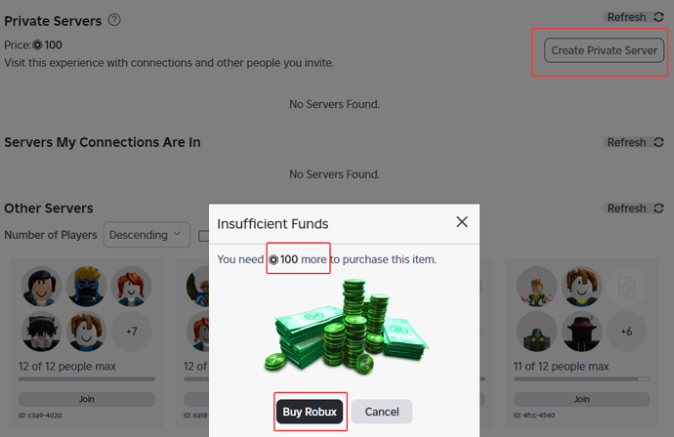
How to Invite Friends to Your The Forge Private Server
Once your private server is up and running, you can invite friends or restrict access as you see fit. Here’s how to configure your server and add players:
- On the Servers page, click the three-dot icon next to your private server.
- Select the 'Configure' option from the drop-down menu.
- Ensure the 'Allow Joining' toggle is enabled to let friends join your server.
- You can allow all your friends to join or manually select who gets access by adding their names to the list.
If you ever decide you don’t need the private server anymore, simply cancel the subscription. To do so, go back to the 'Configure Private Server' page and turn off the 'Subscription Status' toggle.
Should You Get a Private Server in The Forge?
Absolutely! If you want to maximize your mining profits and enjoy a smooth, undisturbed experience, a private server is a must in The Forge. You’ll no longer have to worry about cheaters or other players interfering with your ore collection. Plus, with full control over who can join, you’ll be able to share the experience with your friends or keep it completely private for the ultimate peace of mind.
Ready to set up your own private server and enhance your gameplay? Don’t forget to grab some cheap Robux at SSEgold to get started. With SSEgold, you can make your experience even better and ensure you have all the resources you need to thrive in The Forge.
Table of contents
Buy The Forge Products
Recommended Article